
Overview
A CC Authorization Form collects a guest's credit card authorization for a group or event, with no paper form and no chasing. You send it from the opportunity, the guest completes it on your property's secure Sertifi page, and Matrix tracks where it stands on the opportunity's Documents tab.
The authorization is open: the card is captured and verified without holding an amount.
Matrix never sees or stores the card number. The guest enters the card on Sertifi's page, and that is where it stays. Matrix keeps the status, the card brand and last four digits, and the results of Sertifi's checks on the card.
A property needs its Sertifi account connected before it can send CC Authorization Forms. Until then, choosing the option shows Setup needed with a Go to Integrations settings link.
Before You Start: Connect Sertifi
An admin connects Sertifi once for each property, under Properties, the Integrations tab, Credit Card Authorization. Matrix encrypts the credentials before storing them, and each property connects its own Sertifi account, so a portfolio with several hotels sets this up at each one.
The full walkthrough, including the API key and the Real Time Updates settings inside Sertifi that keep the status current, is in Connect Sertifi to Matrix (Admin Setup).
If nobody has connected the property yet, Actions then CC Authorization Form opens a Setup needed message with a link straight to the property's integrations settings.
How to Send a CC Authorization Form
-
Open the Opportunity. It must be at Tentative or Definite
-
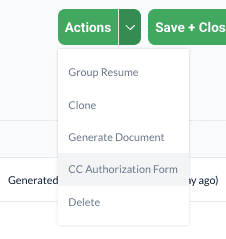
Click Actions (top right) and choose CC Authorization Form
-
Check Select Contact. Matrix fills in the opportunity's primary contact, and you can change it as needed
-
Click Send Form
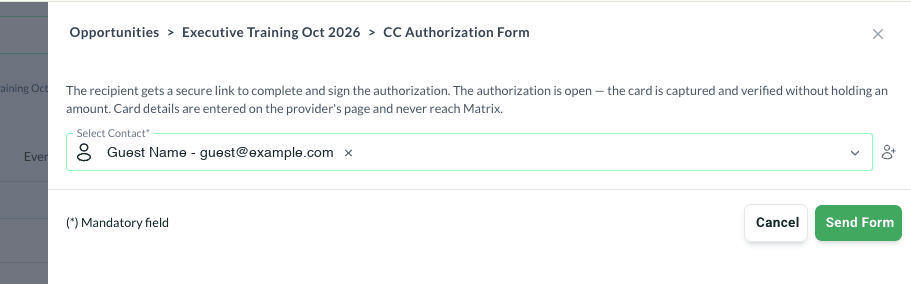
There is no preview step. The guest's email and form carry your property's name and the opportunity's name, so they know what they are authorizing, and the guest only enters the card and billing details.
The option is greyed out at any other stage. Move the opportunity to Tentative or Definite first.
Each recipient gets a separate form. If rooms go on one card and food and beverage on another, send one to each person paying.
What the Guest Sees
-
An email from Sertifi, sent in your name and branded with your property. The subject starts with your property's name and Payment Request for Credit Card Authorization, followed by the opportunity's name. It has a Review and Pay button, plus a plain link in case the button does not work
-
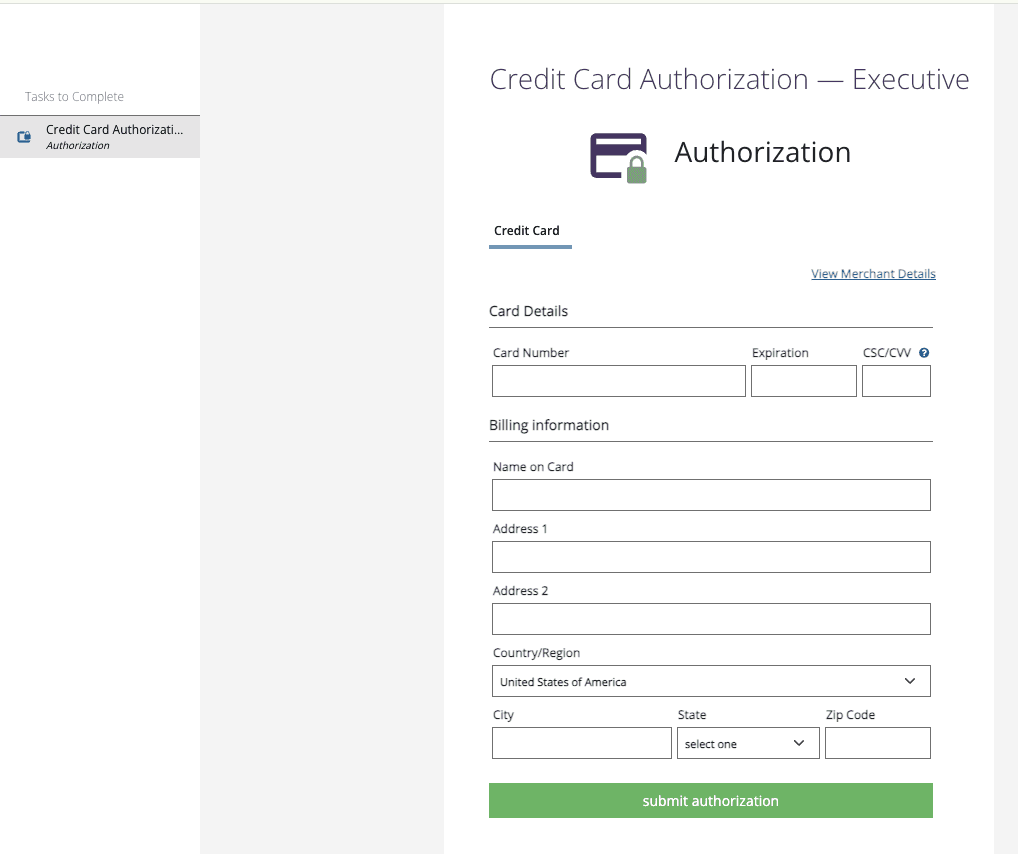
A secure form on your property's Sertifi page, where they enter the card number, expiration and CSC/CVV, the name on the card and the billing address, then click submit authorization
-
A confirmation email once the card is authorized, showing the card type, its last four digits and a transaction ID. The amount shows as $0.00, because the authorization holds nothing
Tracking the Authorization
Open the opportunity's Documents tab. Below the documents list, the CC Authorization Forms section shows one row per form sent, with Recipient, Status, Card, Lifecycle and Actions columns.
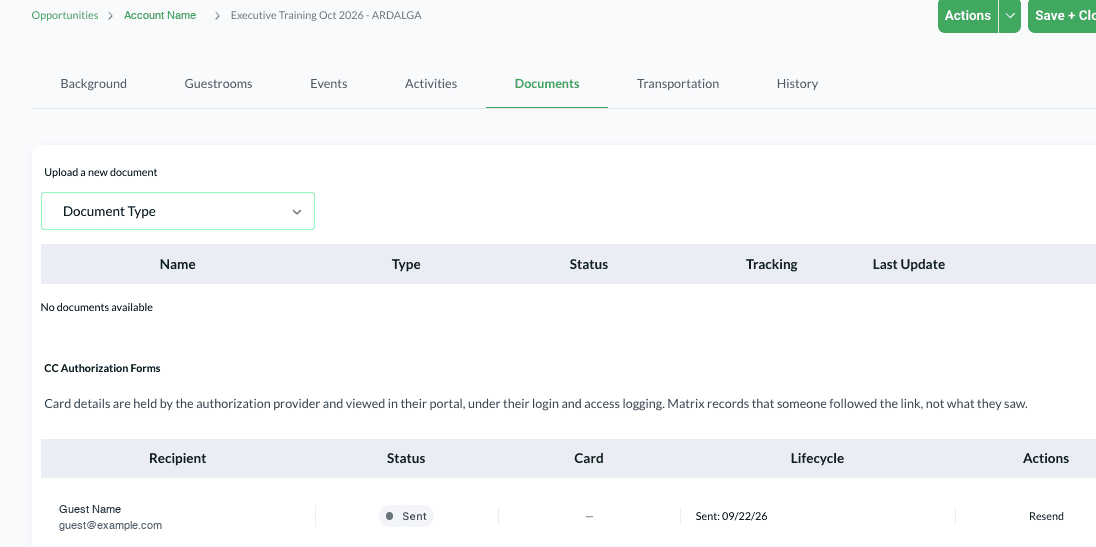
The status moves as the guest works through it, and the Lifecycle column records the date of each step.

Once the card is authorized, the row shows the card brand and last four digits, the results of Sertifi's address, CVV and fraud checks, and a View in Sertifi link.

| Status | What it means |
|---|---|
| Sent | The form has gone out to the guest |
| Opened | The guest has opened it |
| Authorized | The card has been authorized. The Lifecycle column records the date as Completed |
| Declined | The guest declined to complete it |
| Expired | The form expired before it was completed |
| Failed | The card could not be authorized |
A form still at Sent or Opened can be sent again with Resend on its row. Resending sends a fresh copy and keeps the earlier ones in the record, so you can see the whole history.
Viewing the Card
For an authorized form, View in Sertifi opens that authorization in your Sertifi portal in a new tab, where you see the full, unmasked card details. You sign in to Sertifi to see them, and Sertifi controls and logs who views the card. As the Documents tab puts it, Matrix records that someone followed the link, not what they saw.
On the Group Resume, the Group Master credit card authorization line under Payment Information becomes the same link once an authorization is completed.
What Happens Automatically
-
The CC Auth Due activities complete themselves. The two CC Auth Due auto activities are marked complete as soon as Sertifi confirms the card is authorized, and the Group Rooms & Events Control report reflects it. They wait for the card, not the signature, so a form that was signed but then declined leaves them open. Resending a form does not affect them. See Auto Activities.

-
Both sides get an email. The opportunity assignee and the guest are both emailed when the card is authorized, and when a card is declined. The assignee also hears, with the reason, if a form expires or fails. See How Matrix Notifies You.
FAQ
Who can send a CC Authorization Form? Anyone assigned to the property who can send contracts and BEOs.
Does cloning an opportunity copy its authorizations? No. A cloned opportunity starts with none.
If the opportunity changes stage after I send, does the form stop? No. A form that has already gone out carries on regardless of the stage.
Why does the guest's confirmation say $0.00? The authorization is open. It captures and verifies the card without holding an amount.
Can I still collect cards some other way? Yes. This is one way to do it, not a requirement. It is the easiest to track, because the status sits on the opportunity with everything else.
Questions? Email support@m1intel.com