
Overview
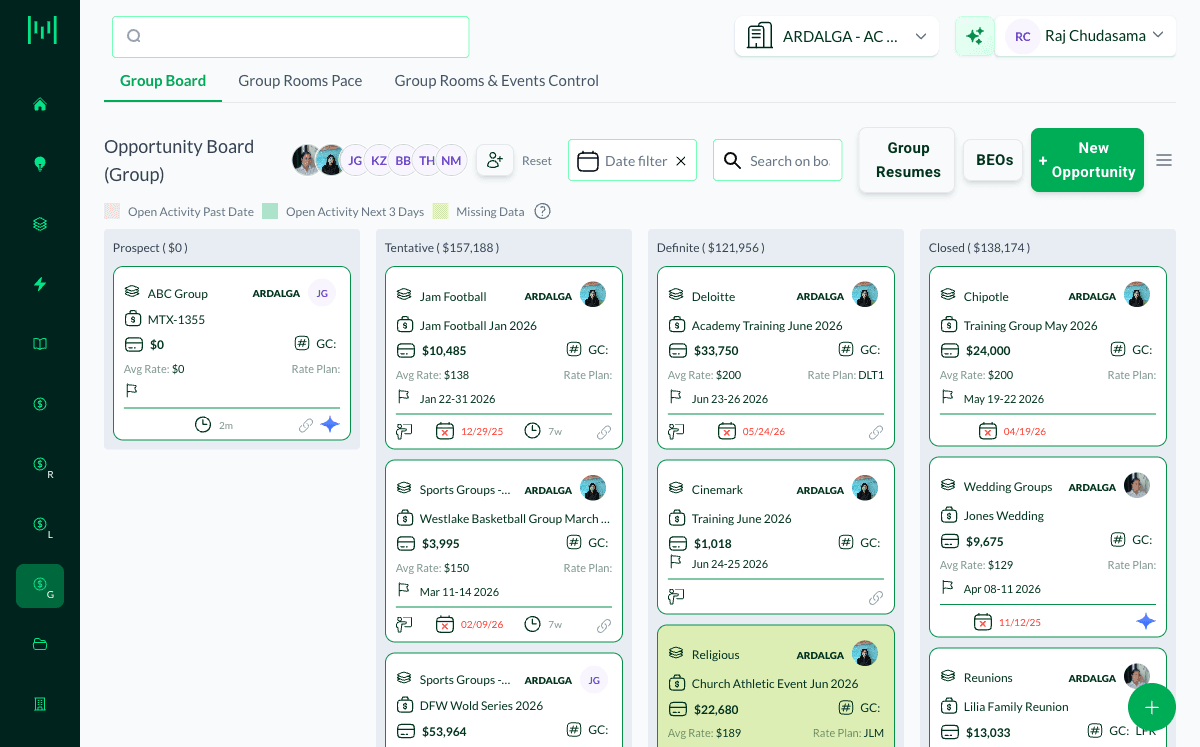
One of the best sources of new group business is groups that have already stayed with you. In Matrix, those past groups live in the Definite, Closed, and Lost stages on the Group board. Working them on a regular basis is one of the highest-yield prospecting habits in sales.
Where to Find Past Groups
- Open the Group board (Opportunities > Group)
- Review the Definite, Closed, and Lost columns:
- Definite and Closed groups are ones that booked or stayed. These are your repeat candidates.
- Lost groups are ones you pursued but did not win. These are second-chance candidates.
- Use the Date filter to focus on a past period, for example groups from this same time last year
How to Prospect Them
Work the booking window. A group that stayed last spring is a warm lead for this spring. Reach out ahead of their typical booking window so you are first in line.
Re-open lost business. Circumstances change. A group you lost on rate or availability last year may be winnable now. Check why it was lost and whether that has changed.
Clone to recreate a returning group. When a past group commits again, use Actions > Clone on the opportunity to recreate it with the key details retained, instead of building it from scratch.
Log every touch. Record your outreach as an activity and trace a next step, so the prospecting effort stays visible and nothing slips.
Best Practice
Make past-group prospecting a recurring routine. Block time each month to work the same period a year out across the Definite, Closed, and Lost stages. Repeat groups are warmer, faster to close, and often more profitable than cold leads.
Questions? Email support@m1intel.com